How layout guides your readers (and keeps them engaged)
Welcome back to my ‘Engage or Bounce?’ series! Last time we talked tone—today, let’s tackle layout. Even the best words fall flat if your layout sends readers running.
You’ve got the tone nailed, but is it easy to read? A complex layout means your reader must make more effort, and that alone can be enough to make them bail out. Your structure needs to catch their attention, then keep it by smoothing them gently through your articles.
Ever landed on a page and clicked away without really knowing why? Stick with me—I’ll show you how simple layout tweaks can keep eyes glued to your content.
What you’ll learn
- Why layout influences attention and comprehension
- How headings create a visual path for readers
- The role of white space in reducing cognitive load
- When to use lists and tables for clarity
- Quick layout fixes that instantly improve readability
Why layout matters
Readers make instant decisions about whether to read your content or move on. A strong visual structure keeps them engaged by guiding their eyes, reducing effort, and making your message easier to absorb. A clean layout shapes how your audience experiences your writing.
Layout is your silent salesperson
Your content might be brilliant, but if the layout feels cramped or chaotic, readers won’t stick around long enough to appreciate it. This is something I see all the time when editing client content. According to research by Nielsen Norman Group, people often decide within 10 seconds whether to bounce or engage, so it’s clear that your layout speaks before your words do. Get this right, and the door’s open.
Headings guide the reader’s journey
Visual hierarchy is one of your strongest tools. Clear, bold headings act like signposts, helping readers understand what’s coming next.
● Heading 1 (Your article’s main title)
Introduces the big idea.
● Heading 2 (Paragraph headings)
Breaks the article into logical sections
● Smaller Sub-headings
Divide complex points into manageable chunks within a paragraph. This structure keeps readers oriented and reduces friction.
White space isn’t wasted space
A blank line beneath a heading helps readers reset before moving on. Generous spacing prevents your article from becoming a dense block of text, which many people find overwhelming. Think of white space as a pause — a moment that makes the next idea easier to absorb. Don’t make it too big though, or the heading becomes separated from the paragraph, and the reader can lose the thread.
Lists and tables improve clarity
Tables
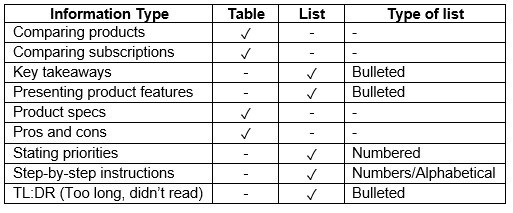
Ideal for comparisons because they show differences side-by-side. Both formats break up text, improve clarity, and help readers process information quickly. Here’s a quick check to help you decide which to use. It will always depend on what information you want to put across, but these are some of the most common scenarios.
Lists
Perfect when you’re presenting multiple points or features. They make information easier to scan and increase the value your reader gets from your content. When deciding between bulleted, numbered, and alphabetical lists, just consider what’s logical.
Quick tips
- Add white space around headings to improve flow
- Use bullet points instead of long, dense paragraphs
- Make headings bigger and bolder to guide attention
- Break up text with subheadings every 150–200 words
Wrapping up
Great layout doesn’t just look good — it works hard for you. It guides readers through your content, highlights what matters, and makes the experience easy. Your message deserves to be understood, and strong structure ensures it lands.
If you’re not sure whether your layout is helping or hurting, I’m happy to take a quick look. Get in touch here.